

Professional Development and Services
Online@JSU provides several professional development opportunities for faculty at Jacksonville State University, such as:
- Partner with an Instructional Designer
- Canvas On-Demand Training Services Portal
- New Faculty Orientation to Online Learning and the Canvas Learning Management System
- Request a Course Build
- Course Reviews, Program Reviews, and Program Audits
- Live Workshops & Webinars
- Request a Group Training Session
Open each accordion below to learn more about our professional development services.
Partner with Instructional Designer
Whether you are new to Jacksonville State University, or a veteran, faculy are encouraged to partner with an instructional designer (ID) within Online@JSU throughout their professional career at Jacksonville State University. Instructional designers serve as consultants, collaborators, and sources of support.
Please complete the Faculty/ID Partner Interest Form
Our team will review the interest form and one of our instructional designers will reach out to you.
Thank you for your interest in partnering with us! We are excited to work with you!
What is an instructional designer?
An instructional designer is an educational consultant, learning experience designer, and faculty development professional who partners with instructors to create high-quality, accessible, engaging, and evidence-based learning experiences that improve student success while advancing institutional teaching and learning goals. Instructional designers within Online@JSU have over 40 year of combined experience in teaching, partnering with faculty, and providing professional development and guidance.
What do instructional designers do?
Instructional designers serve as strategic partners in teaching and learning, applying expertise in curriculum design, learning science, educational technology, project management, and multimedia development to collaborate with faculty in designing high-quality, accessible, and engaging learning experiences that improve student outcomes, support instructional excellence, and advance the university's mission. On a typical day, we perform tasks such as:
- conduct needs assessments to evaluate learning needs and identify the target audience
- collaborate with subject matter experts to ensure instructional content is accurate and comprehensive
- write instructional content and design learning materials such as training materials, online courses, video tutorials, and instructor guides
- use e-learning authoring tools like Articulate Storyline to develop job aids and interactive modules
- manage projects, ensuring the instructional design process stays on track with timelines and deliverables
- apply formative evaluation and summative evaluation techniques to measure effectiveness
- incorporate Bloom’s Taxonomy and other instructional design models to structure learning objectives step by step
- Source: Penn State World Campus, 2026

Introduction
The Instructure Canvas Training Portal provides a wide range of training topics and opportunities delivered through various modalities such as:
- Live Webinars
- Live Drop-In Sessions
- On-Demand Courses
- Learning Pathways (collections of courses by topic)
- Live Training Calendar
Faculty are encouraged to explore the various training opportunities available and to complete them to increase your knowledge, understanding, and effectiveness in using Canvas to communicate with, engage with, and teach students.
Note: Be advised that some of the features and integration partners (such as Respondus Lockdown Browser) featured in some of the training offerings within the portal are not available at Jacksonville State University.
Benefits of Completing Training via the Canvas Training Portal
- Increase knowledge and proficiency in leveraging Canvas to organize and manage content, to use tools to engage with and communicate with students, create engaging content, activities, and assignments.
- Earn digital badges to signify completion; badges can be shared via social media such as LinkedIn
- Complete On-Demand asynchronous courses on your time and maintain access to the courses after completion.
- Schedule live webinars that best accommodate your schedule
Earning Digital Badges
The faculty earns a digital badge for each On-Demand course and webinar completion.
On-Demand Course Completion Times
Suggested time of course completion per On-Demand course varies depending upon how many recommended activities faculty complete during the course.
Recommended Training
Jacksonville State University strongly encourages faculty to complete the following course offerings:
- First Day Ready Learning Pathway OR Canvas Basics
- Canvas Teacher App (Android or iOS)
- Studio Academy - Instructure Learning Platform
- Fundamentals of Accessible Digital Content
- Templates & Sharing Learning Pathway
- New Quizzes Essentials
- Engaging Learners
- Canvas Portfolios Unlocked: Create, Evaluate, and Showcase
Learn More about the Listed On-Demand Courses
Accessing the Training Portal
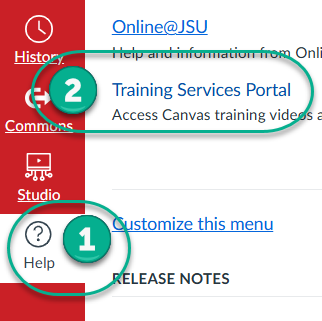
Login to Canvas.
- On the Global Navigation Menu, click on “Help.”
- Click on “Training Services Portal.”
Orientation to the Canvas Training Portal
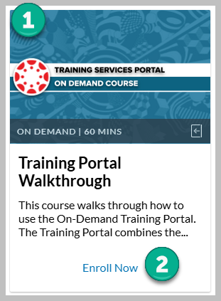
Complete the Training Portal Walkthrough On-Demand training course. The course walks through how to use and navigate the On-Demand Training Portal, and demonstrates how to locate and register for training offerings or live webinars, outlines the structure of each course, and demonstrates how to earn and access badges and download and view transcript reports.
- Access the Training Services Portal in Canvas.
- Scroll down the dashboard page and locate Training Portal Walkthrough [1].
- Click on Enroll Now [2].
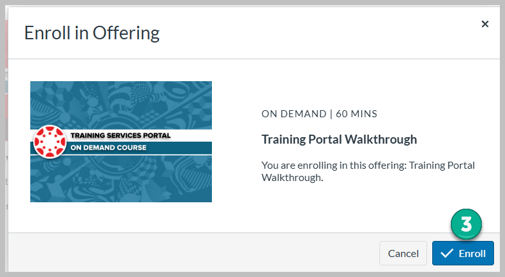
- Click on the Enroll button [3].
-
- Complete the course. After completion of the course, you can click on Parchment Badges in the course navigation menu to download your badge and share it on social media. (If page content does not load after clicking on Parchment Badges, refresh the browser until it loads.)
New Faculty Orientation to Online Learning
If you are new to Jacksonville State University, please take a few minutes to review New Faculty Orientation to Online Learning at Jacksonville State University. This brief orientation will introduce you to our unit, Online@JSU, our personnel, the services we provide and the software we support.
Orientation to the Canvas Learning Management System
We also recommend that faculty new to Jacksonville State University and the Canvas Learning Management System complete a series of identified training courses within the Canvas On-Demand Training Services Portal.
Faculty at Jacksonville State University may request a course build from instructional designers within Online@JSU. Once a course build is requested, faculty will meet with the instructional design team to discuss goals and needs.
The Course Build Process
The course build process follows five phases whereby faculty and instructional designers partner together to develop, design, build, and launch a course.
The Five Phases
- Analysis
- Design
- Develop
- Implementation
- Evaluate
Analysis
During this phase, faculty and instructional designers:
- Define the course learning objectives.
- Identify the audience.
Design
During this phase, faculty and instructional designers use backward design to:
- Create course structure and sequencing to logically organize content into modules, units, or lessons.
- Identify and outline assessments that demonstrate student achievement of the stated learning objectives.
- Create a complete course map that demonstrates course alignment.
Develop
During this phase, faculty and instructional designers:
- Create course templates in Canvas.
- Develop the assessments designed during the Design phase, and create them in Canvas.
- Create rubrics, checklists, assignment instructions, record videos, and locate resources.
- Create learning modules/units/lessons in Canvas, and organize content and assessments within the modules.
Implementation
During this phase, faculty and instructional designers:
- Conduct a usability check, an accessibility check, and a mobile compatibility check.
- Finalize and create course orientation material for students.
- Perform a final gradebook check to ensure assignments and assignment groups are set correctly on the Assignments Index page and in the gradebook.
- Launch (publish) the course.
- Faculty teach the course.
Evaluate
During this phase, faculty and instructional designers will:
- Review student feedback.
- Make any identified adjustments or changes to the course design or build.
Request a Course Review, Program Review, or Program Audit
Online@JSU offers three different course review options for faculty at Jacksonville State University:
- Single Online Course Reviews (initiated by a faculty member)
- 100% Online Program Review (initiated by college, school, department, or program leadership)
- 100% Online Program Audit (initiated by college, school, department, or program leadership)
Request a Course Review
Faculty at Jacksonville State University may request a course review at any time. During a course review, instructional designers review the course, provide feedback, provide suggestions or recommendations for improvement, and work with the instructor, if requested, to assist the instructor in making the recommended changes to the course.
The instructional design team utilizes an adapted form of the Quality Matters (QM) rubric, which is the standard course review instrument for exemplary online courses.
Program Review or Program Audit
Leaders of 100% fully online programs at Jacksonville State University may request a program review or program audit at any time.
Program Review
During a program’s review period, the program leaders (deans, department chairs, program coordinators, etc.) and instructional designers agree upon a course review schedule/timeline and instructional designers (IDs) review each online course within the program and partner with faculty to revise, or develop, courses if needed. At that time, ID's also offer services such as course building, template building, and more assistance as needed.
Program Audit
During a program audit, the instructional design team reviews all courses within the program and provides a comprehensive report to the academic leader who requested the audit. An audit is intended to provide a snapshot of current course standards to academic leadership for informational and programmatic planning purposes according to widely accepted standards and practices in online course design, build, and delivery.
Key Resources
- Updated 2025
- Use this rubric to prepare your online course
- This rubric is used to assess and certify online courses
Online Course Design Workbook: A Guide for Faculty
- Updated June 2026
- A step-by-step guide to assist faculty in designing and buidling an online course
- Contains templates and examples
Online@JSU regularly partners with instructors across JSU to offer faculty a breadth of presentation and workshop options. Topics range from teaching and learning theory, online teaching strategies and techniques, best practices in online teaching and learning, multimedia, virtual classrooms, and building online and hybrid courses.
Online@JSU provides group training sessions for colleges, schools, departments, and programs upon request at Jacksonville State University, via synchronously in Microsoft teams or in-person. Prior to submitting a request, please review existing resources, tutorials, guides, and scheduled workshops to determine whether the topic(s) are addressed.
Note: Group training session requests should be submitted at least two weeks prior to the requested presentation date.
Topics
- Canvas LMS
- Modules/Pages
- Assignments/Discussions
- New Quizzes
- Course Features
- New Features
- Outcomes
- More
- Canvas Studio
- DesignPLUS
- Honorlock
- Turnitin
- Other topic not listed